MuleSoft for Salesforce: When You Need a Dedicated Integration Developer vs. Your In-House Admin

Most Salesforce teams run on the strength of a skilled admin who builds flows, manages objects, and keeps automation running smoothly. That skill set covers a lot of ground. It does not automatically cover MuleSoft for Salesforce developers work, where the project moves outside Salesforce entirely and into connecting ERP systems, external databases, and third party APIs. Knowing where that line sits saves budget and avoids a stalled integration.
Key Takeaways
- Declarative Salesforce skills (Flow, Process Builder style automation) do not transfer directly to Anypoint Studio, DataWeave, or API design work.
- A handful of clear signals, like connecting three or more external systems or needing real time bidirectional sync, mark the point where a dedicated MuleSoft developer becomes necessary.
- IdeaGCS's technical staffing service can place a certified MuleSoft developer on a project basis, so you are not stuck choosing between a slow hire and an under scoped in-house attempt.
What a Salesforce Admin Can Actually Handle
A strong Salesforce admin, or even a declarative developer comfortable with Flow and Apex triggers, can carry a surprising amount of integration work. Native connectors, simple REST callouts to a single well documented API, and scheduled batch jobs between Salesforce and one other cloud system are all reasonably within reach for someone who lives inside the Salesforce platform daily.
The common thread across all of that work is scope. One source system, one target system, a predictable data shape, and low transaction volume. Salesforce's own tooling, including Flow Orchestrator and simple Apex callouts, was built to make exactly this kind of point to point connection approachable without deep integration architecture experience. Problems start when any one of those constraints breaks.
In practice this covers a lot of everyday requests. Syncing a lead to a marketing platform, pulling order status from an ecommerce connector, or posting a support case to a helpdesk tool through a native AppExchange package all sit comfortably inside this zone. None of it requires custom transformation logic, and none of it needs to survive a spike to thousands of records an hour. That is exactly the profile an admin should keep in-house rather than routing to a specialist. It also keeps ownership simple, since the same person who built the automation can debug it without handing context to someone else.
Where Declarative Configuration Hits Its Limit
The moment a project needs to orchestrate more than two systems, transform data between incompatible formats, or guarantee delivery under high transaction volume, declarative tools start to strain. A mulesoft developer thinks in terms of System, Process, and Experience APIs, a layered architecture that a Flow-based approach was never designed to express, as MuleSoft's own Mule runtime documentation lays out in detail.
DataWeave, MuleSoft's transformation language, exists precisely because mapping complex nested data between an ERP, a legacy database, and Salesforce is not a drag and drop problem. Error handling, retry logic, and message queuing also become real engineering concerns rather than checkbox settings once volume climbs. This is usually the point where an admin's time is better spent on Salesforce configuration, not fighting an integration pattern outside their training.
A concrete example helps. Syncing new opportunities into a finance system once a day is simple. Keeping inventory counts synchronized in near real time across Salesforce, a warehouse system, and an ecommerce storefront, with retries if any one system is briefly unavailable, is not. The second case needs durable queuing and a defined failure strategy, not a scheduled Flow that quietly stops working the first time an API call times out.
What a Dedicated MuleSoft Integration Developer Brings
A salesforce mulesoft developer, or more precisely a MuleSoft integration developer with Salesforce familiarity, brings Anypoint Studio proficiency, DataWeave transformation skills, and API-led connectivity design experience that a declarative admin role does not train for.
A certified mulesoft developer has also validated that skill set against MuleSoft's own certification tracks, which is a meaningful signal when you are hiring on a project basis rather than watching someone learn on the job. Beyond raw skill, this role owns architecture decisions, like whether an integration should run through CloudHub, be deployed to a customer's own infrastructure, or use a hybrid model, decisions that shape cost and maintainability well past launch day.
There is also an ongoing maintenance dimension that is easy to underweight up front. Once an integration is live, someone needs to monitor API error rates, manage credential rotation, and update mappings when a connected system changes its schema. A dedicated developer treats that as normal operational work with the right tooling in place. An admin who inherited the integration as a side project usually finds out about a broken mapping only when a business user complains.
A dedicated developer also gets more value out of Anypoint Exchange, MuleSoft's library of reusable connectors and templates, because recognizing which prebuilt asset fits a given system shortens delivery time considerably. That kind of pattern recognition comes from having built several integrations before, not from a first attempt learned under project deadline pressure.
Signals Your Project Has Crossed the Complexity Threshold
A few concrete signals tend to show up before a project outgrows what an in-house admin can safely own. Watch for a project that touches three or more external systems at once, since coordinating that many moving parts through declarative tools alone gets fragile fast. Watch too for any requirement around guaranteed message delivery, where a failed sync cannot simply be retried manually the next day.
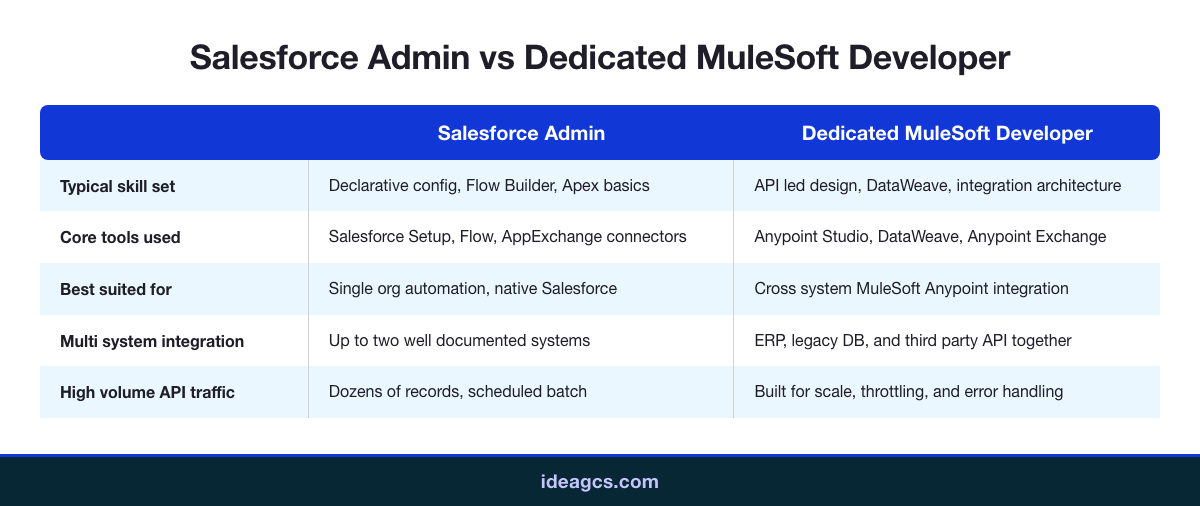
Real time or near real time bidirectional sync is another marker, along with any transformation step that reshapes nested or hierarchical data rather than mapping flat fields one to one. Sustained high volume, meaning thousands of records per hour rather than dozens, rounds out the list. One of these signals alone might still be manageable. Two or more together is a strong indicator the project needs a dedicated developer, not an admin working evenings to keep up. The comparison below lines up the two paths side by side.
Staffing the Role: Hire, Contract, or Managed Team
Once a project clears that threshold, the question shifts from whether you need a dedicated developer to how you bring one on. Hiring a full time mulesoft integration developer makes sense when integration work is ongoing and central to the business, but recruiting timelines for niche MuleSoft skills often run long, and a single hire has no backup if they leave mid project.
Contracting through a technical staffing partner gets a certified developer on the project faster and scales down cleanly once the integration is live and stable. IdeaGCS has also published a broader look at hiring top IT talent, which covers the same build versus staff tradeoff across other technical roles, not just MuleSoft.
Cost is rarely the deciding factor by itself. A full time hire carries salary, benefits, and ramp up time even before writing the first integration flow, while a contract developer starts producing from week one but costs more per hour worked. The right call usually comes down to duration: a single project with a defined end date favors a contract or staffed placement, while an organization planning ongoing MuleSoft work across multiple projects gets more value from a permanent hire once volume justifies it.
Whichever path you choose, vet for the same things: verified MuleSoft certification, a portfolio of Salesforce-adjacent integration work rather than generic API experience, and clear communication about architecture tradeoffs before code gets written. A developer who cannot explain why they chose CloudHub over an on premises deployment for your specific case is a weaker hire than one who can walk you through the reasoning in plain language.
Conclusion
Your Salesforce admin is not the wrong person for the job because they lack general skill. They are the wrong person once a project needs API-led architecture, DataWeave transformations, and multi system orchestration that Salesforce's own declarative tools were never built to express. Use the signals above to spot that line before a stalled integration forces the decision for you. If your project has crossed it, talk to IdeaGCS about placing a certified MuleSoft developer on your team. Getting the staffing decision right the first time is almost always cheaper than reworking an integration a well meaning admin built past the point it could safely handle.
Frequently Asked Questions
Can a Salesforce admin learn MuleSoft on the job?

What makes someone a certified MuleSoft developer?
Is MuleSoft for Salesforce developers the same as a Salesforce developer role?
How long does a typical MuleSoft integration project take?
Do I need a MuleSoft developer for a single API connection?
What is DataWeave and why does it matter for hiring?
Can IdeaGCS provide a MuleSoft developer on a contract basis?
What happens if I use an admin for a project that needed a developer?
Does hiring a salesforce mulesoft developer replace my admin?
What skills should I check for when hiring a MuleSoft developer?
Contact Us
Share on Social Media
Contact Us